
Git Collaboration Activity
Credit: This activity was designed by Semmy Purewall
This activity is designed to be completed entirely in class. The goals with this activity are as follows:
- Practice with merge conflicts
- Practicing with various merging/rebasing strategies
- More practice with basic git & CLI stuff
For this activity, you’ll work with (at least) one other person. The person who creates the initial repository will be called the “owner.” Any additional collaborators will be called “the collaborator”
Part 1: Merging
Nominate one person in your group to be “the owner.”
1.1. Owner setup
If you are the owner, you will create a new git repository as follows:
-
Open a new command line shell (Windows users use WSL), navigate to your
csci338folder, and make a directory calledmerge-activity:$ mkdir merge-activity - Navigate into the directory (
cd merge-activity) - Initialize a new git repository (
git init) - Create a
README.mdfile directly inside ofmerge-activity. InsideREADME, add a heading that says “Merge / Rebase Practice” - Stage your
README.mdfile using (git add .) - Commit it (e.g.,
git commit -m "Added README.md") -
Next create a
my_code.pyfile. It should look like this.def say_hello() -> None: print("hello world!") if __name__ == "__main__": say_hello() - Commit it.
- Now create a private repository on GitHub (github.com) for your local git repository and push your local repository to the remote repository.
- After a successful push, add your collaborator(s) to the repository (GitHub > Settings > “Collaborators and Teams”).
1.2. Collaborator setup
After the owner has added you as a collaborator to the merge-activity repo, you are going to clone their repository. To do this:
- Open a new command line shell (Windows users use WSL), navigate to your
csci338folder. - *From within the
csci338folder, clone the themerge-activityrepo using the SSH protocol. If you forgot how to do this, refer back to Lab 2. - Navigate into the
merge-activityrepo that has just been created on your local machine.
You and your partner are now going to work on two features in parallel. The owner will work on Feature A and the collaborator will work on Feature B. Both of your repositories should have the same remote urls.
Question: Which Git subcommand can you use to confirm that? Go ahead and confirm it.
Answer: git remote show origin
Complete the next two sections in parallel.
1.3. Creating a conflict
You are now going to both edit the same file on different branches and practice resolving the conflicts.
Feature A (Owner)
This feature will be implemented on the main branch.
The owner of the repository should complete Feature A.
To complete feature A, you will modify the say_hello function definition to (a) accept a name parameter, and (b) output a greeting and the name.
- If you don’t know how to do this (totally expected if you’re new to python), try Googling it or using an AI tool. When you’re at your first job or internship, you’re going to need to “learn how to learn” a new language, so this is good practice.
When you invoke your function as follows:
say_hello("Walter")
say_hello("Ruth")
say_hello("Larry")
say_hello("Helen")
It will print out:
Hello Walter!
Hello Ruth!
Hello Larry!
Hello Helen!
Once this is tested and working, commit it locally, then push your main branch to the remote repository on GitHub.
Feature B (Collaborator)
The collaborator will complete a slightly different feature on a different branch. First, create and check out a branch.
$ git checkout -b feature-b
The job of feature-b is to print the same “hello world!” message n times. To do this, rename say_hello -> say_hello_n, and add a parameter to specify the number of times the message should be repeated. Then, use a loop in the body of the function to print the message n times.
- If you don’t know how to do this (totally expected if you’re new to python), try Googling it or using an AI tool. When you’re at your first job or internship, you’re going to need to “learn how to learn” a new language, so this is good practice.
When I invoke your function as follows:
say_hello_n(3)
It will print out:
hello world!
hello world!
hello world!
Once you’re happy with your change, commit it locally, but do not push anything yet.
1.4. Pulling down the owners changes
Once you’re both finished with the sections above, you’ll work together on this section on the collaborator’s computer.
At this point, we are in the situation where you are in a feature branch, but main is ahead (i.e., changes have been made to main since you branched from it, making the collaborator’s branch is no longer in sync with main).
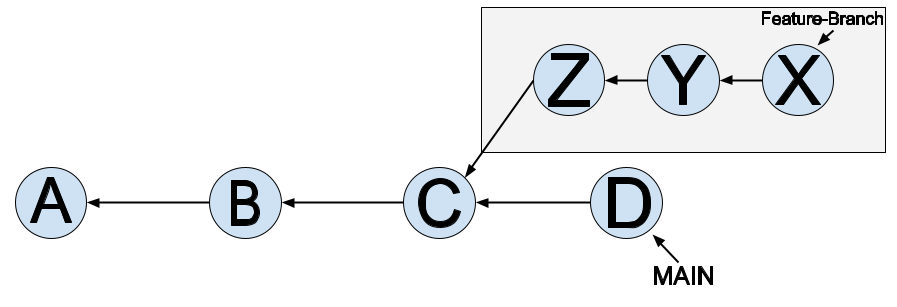
Check the state of your git repository and make sure you’re on the feature-b branch. Let’s checkout main on your laptop and then pull your partner’s changes down from GitHub.
$ git checkout main
Confirm you’re on the main branch now.
$ git pull origin main
Now take a look at the history (git log) to make sure you see the commit that
implements feature A. Then, check out your feature branch again:
$ git checkout feature-b
Let’s take a look at the history again. Do you see the commit with feature A? Probably not, but you can see it by doing this:
$ git log --all
And if you want a visual representation, add the --graph
option. Where is HEAD? Where is feature-b?
$ git log --all --graph
1.5. Merging
Let’s merge the branches! First, check out main again. Take a look at
the history (with all commits and the graph option enabled). Where is
HEAD?
Now let’s use the merge subcommand to merge the branches. Make sure
you’re on main and then run:
$ git merge feature-b
This attempts to merge the feature-b branch into the main
branch. It should look something like this:
<<<<<<< HEAD
[Feature A Code]
=======
[Feature B Code]
>>>>>>> feature-b
Note that [Feature A Code] will be replaced with the actual code
associated with Feature A. The top part represents the state of the
code at your HEAD (in this case, HEAD is an alias for main).
Before going further, take a look at the state of your
repository. Note that git gives you helpful instructions on how to
proceed – you can either fix the conflicts and then run git commit -m "some message"
which will create your merge commit, or you can abort the process
altogether.
Your job is now to reconcile these conflicts, and remove the merge conflict separators. Do that now. At the end of your reconciliation, both features should work as expected. You can test them by running it with Python.
Once that’s done, let’s take a look at the state of the repo again. Git should tell you that you’re good to go!
$ git status
Let’s take a look at the log with the --graph option. You should see
your merge commit with two parent pointers.
Commit and push the changes to the main branch on Github, and take a look at all
the commits. Have your partner (the owner) pull down the changes. You both should now have the exact same code on the main branch.
Part 2: Rebasing
We’re going to to do a rebase and fast-forward this time, instead of a merge. Let’s reverse roles now so that the owner becomes the collaborator and vice-versa.
2.1. Owner setup
Repeat Step 1.1 above, but instead of working with merge-activity, you will create a new repo within csci338 called rebase-activity.
Your directory structure should look something like:
csci338
├── class-exercises-fall2025
├── lab01
├── merge-activity
└── rebase-activity
2.2. Collaborator setup
Repeat Step 1.2 above, but with the rebase-activity repo.
2.3. Creating a conflict
Repeat Step 1.3 above, but with the rebase-activity repo.
2.4. Pulling down the owner’s changes
Repeat Step 1.4 above, but with the rebase-activity repo.
2.5. Rebasing
Now, we’re going to rebase the branches to see how this process differs. The collaborator will do the rebase.
Check out main again. Take a look at the history (with all commits and the graph option enabled). Where is HEAD?
Next, we’ll rebase main on the feature-b branch, then fast-forward merge feature-b back into main. So check out the feature-b branch. And then, after confirming you’re in the right place, do the rebase.
$ git rebase main
Git will try to “replay” the new commit in main on top but it will hit the same conflict we saw in the merge case. Read the message Git outputs.
Now take a look at the code. You’ll see it looks something like this.
<<<<<<< HEAD
[Feature A Code]
=======
[Feature B Code]
>>>>>>> 1a0ffaa (Add feature b)
In this case HEAD is main again, since we checked it out to replay
the commits on top. Check the status of the repository, and read all
the hints Git is giving you. Fix the conflicts as you did this time.
Once you’re done, check the status again and read the message.
Question: What should you do now?
Answer:
git add .
git rebase --continue
Once that’s done, you’ve successfully rebase main onto
feature-b. Check the history and note that the commit hash
associated with feature-b has changed as we expected!
We’re not finished yet, because we wanted to get feature-b into
main. Now that main is no longer ahead, we can do a fast-forward
merge into main. To complete this, check out the main branch and do a
merge.
$ git checkout main
$ git merge feature-b
Read the output. Now take a look at the history with the --graph
option. How is the history different from the merge above? Do you see
a merge commit?
Push the changes to Github and take a look at the commits.
Now you’ve successfully fixed some merge conflicts, merged, and rebased. Do you have any opinions on which is better? Talk with your partner about your newly found strong opinions.