Due Mon, 11/09 at 11:59pm
1. Introduction
The goals of this lab are as follows:
- Set up a docker container with a postgres tutorial
- Get some basic experience with SQL
- Get experience interacting with a Postgres database from Python
- Get experience querying the database via an ORM
How this lab is organized
Some sections are practice, which you can work through on your own or together in class. They help you get oriented, and you don’t submit anything for them. The sections marked Submit are the ones that make up your lab grade. Look for the cues: the headings of the sections you submit have a blue Required for submission badge, and the practice sections have yellow boxes.
| Section | Type | What you do |
|---|---|---|
| 3. SQL Practice | Practice | Explore the database in psql |
| 4. SQL Tasks for the Lab | Submit | Write 9 SQL queries in answers_sql.md |
| 5. SQLAlchemy Practice | Practice | Run and read orm_samples.py |
| 6. SQLAlchemy Tasks for the Lab | Submit | Implement 7 functions in answers_orm.py |
2. Setup
Version Control Stuff
Before you begin, get the latest code from class-exercises-fall2026.
On GitHub:
- Sync the latest changes from the class version of
class-exercises-fall2026to your copy of the repo on GitHub.
On your local computer:
- Make sure that all of your changes from the last lab are staged and committed.
- Checkout your main branch:
git checkout main - Pull down the latest changes:
git pull- If you did it correctly, you will notice that a new
lab08folder has been created.
- If you did it correctly, you will notice that a new
- Create a new branch called lab08-b:
git checkout -b lab08-b - Verify that you’re on your new branch:
git branch
Build and run your Docker file
Navigate to your lab08 directory and type:
docker compose up -dAs you may recall, this command builds your Docker container and runs it. Keep your terminal running and do the remaining tasks on anther terminal.
3. SQL Practice (Not Submitted)
Practice: work through this section on your own or together in class. You don’t submit anything from it. It gets you ready for the SQL tasks in section 4.
3.1. The DVD Rental Schema
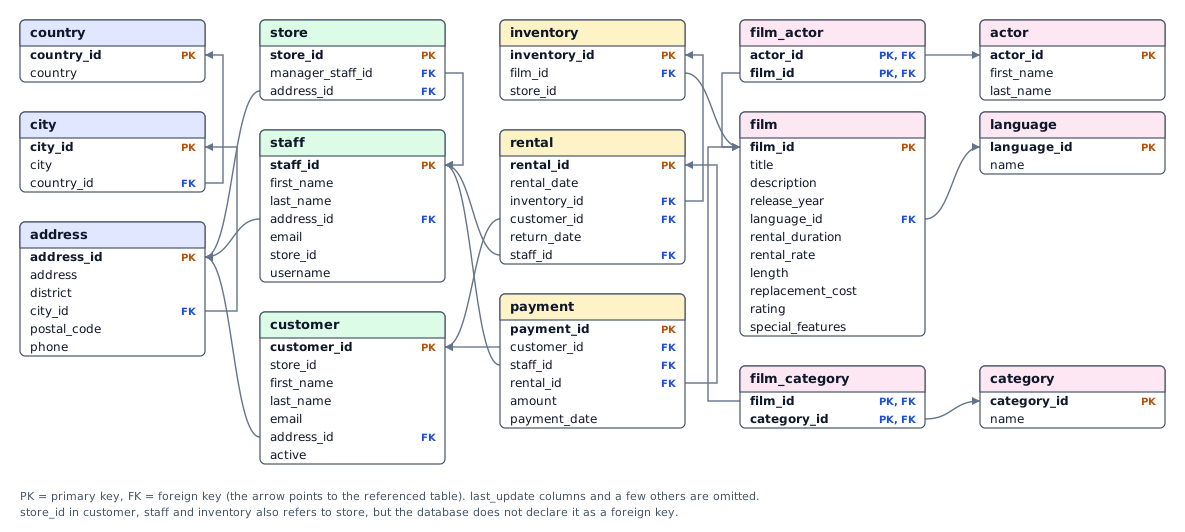
Here is a map of the tables in the dvdrental database and how they connect. Each arrow goes from a foreign key (FK) to the primary key (PK) it refers to. Keep it handy while you write your queries, especially for the JOIN questions. (Click the image to open it full size.)
3.2. Run the Postgres SQL Client
In the new terminal window we’ll run psql (the postgres SQL
client) on the your running container.
# get container id:
docker ps -la

# connect to the docker container
docker exec -it <pid> psql -U postgres
If you did this correctly, you should see a PostgreSQL shell that looks like this:
postgres=#Now let’s confirm things are working. Try typing in the \list
command and confirm you see the dvdrental database.
postgres=# \listIf that works, let’s change to the dvdrental database and run a
simple sql query to list all customer’s first names.
postgres=# \c dvdrental
dvdrental=# select first_name from customer;
3.3. Optional: DBeaver Configuration
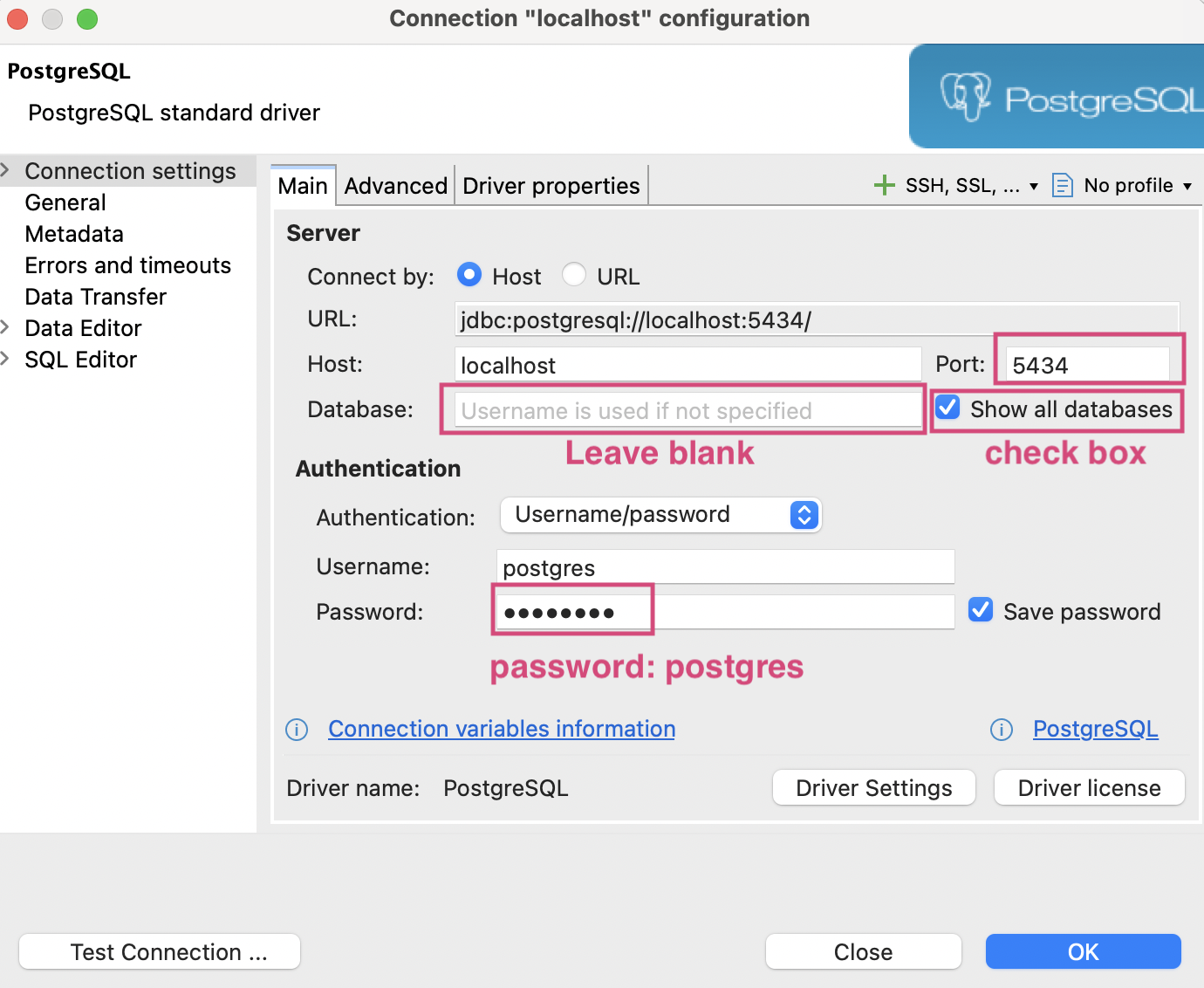
For those of you who would like to look at the data in a visual way, feel free to use DBeaver (which you can download here). Once downloaded and installed, you can preview the DVD Rental database by using the following connection information for a PostgreSQL connection:
- host: localhost
- database: (leave blank)
- username: postgres
- password: postgres
- port: 5434
Also, make sure that the “Show all databases” option is checked (as pictured in the screenshot below):
3.4. Get Oriented: Explore the Database
Before writing your own queries, spend a few minutes looking around. For each exercise below, try to write the command yourself in psql (while connected to dvdrental). Then expand the answer to check your command and compare your output. You don’t need to submit anything for this section.
Tip: Commands that start with a backslash (like
\dt) arepsqlshortcuts. Everything else is SQL and must end with a semicolon (;). If the output is long, press the space bar to page through it andqto get back to the prompt.
Exercise 1. What tables are in this database?
- Hint:
psqlhas a backslash shortcut for listing tables. See the psql commands if you’re not sure.
Show the answer
\dt List of relations
Schema | Name | Type | Owner
--------+---------------+-------+----------
public | actor | table | postgres
public | address | table | postgres
public | category | table | postgres
public | city | table | postgres
public | country | table | postgres
public | customer | table | postgres
public | film | table | postgres
public | film_actor | table | postgres
public | film_category | table | postgres
public | inventory | table | postgres
public | language | table | postgres
public | payment | table | postgres
public | rental | table | postgres
public | staff | table | postgres
public | store | table | postgres
(15 rows)Exercise 2. What columns does the film table have, and which one is its primary key?
- Hint: another backslash command describes a table. Press
qif the output pages.
Show the answer
\d film Column | Type | Nullable | Default
------------------+-----------------------------+----------+---------------------------------------
film_id | integer | not null | nextval('film_film_id_seq'::regclass)
title | character varying(255) | not null |
description | text | |
release_year | year | |
language_id | smallint | not null |
rental_duration | smallint | not null | 3
rental_rate | numeric(4,2) | not null | 4.99
length | smallint | |
replacement_cost | numeric(5,2) | not null | 19.99
rating | mpaa_rating | | 'G'::mpaa_rating
last_update | timestamp without time zone | not null | now()
...The real output has a few more columns plus indexes and foreign keys; this is the part you’ll use most. Notice that film_id is the primary key, and language_id is a foreign key pointing to the language table.
Exercise 3. How many films are there?
- Hint: use the
count(*)function on thefilmtable.
Show the answer
select count(*) from film; count
-------
1000
(1 row)Exercise 4. What does the data look like?
- Select the
film_id,title,release_year,rating, andrental_durationof the first 5 films (byfilm_id). - Hint: list the column names after
select, then useorder byandlimit.
Show the answer
select film_id, title, release_year, rating, rental_duration from film order by film_id limit 5; film_id | title | release_year | rating | rental_duration
---------+------------------+--------------+--------+-----------------
1 | Academy Dinosaur | 2006 | PG | 6
2 | Ace Goldfinger | 2006 | G | 3
3 | Adaptation Holes | 2006 | NC-17 | 7
4 | Affair Prejudice | 2006 | G | 5
5 | African Egg | 2006 | G | 6
(5 rows)Exercise 5. What are the movie categories? You’ll need these names later.
- Hint:
select *returns every column of a table.
Show the answer
select * from category; category_id | name | last_update
-------------+-------------+---------------------
1 | Action | 2006-02-15 09:46:27
2 | Animation | 2006-02-15 09:46:27
3 | Children | 2006-02-15 09:46:27
4 | Classics | 2006-02-15 09:46:27
5 | Comedy | 2006-02-15 09:46:27
6 | Documentary | 2006-02-15 09:46:27
7 | Drama | 2006-02-15 09:46:27
8 | Family | 2006-02-15 09:46:27
9 | Foreign | 2006-02-15 09:46:27
10 | Games | 2006-02-15 09:46:27
11 | Horror | 2006-02-15 09:46:27
12 | Music | 2006-02-15 09:46:27
13 | New | 2006-02-15 09:46:27
14 | Sci-Fi | 2006-02-15 09:46:27
15 | Sports | 2006-02-15 09:46:27
16 | Travel | 2006-02-15 09:46:27
(16 rows)Exercise 6. How are films connected to categories?
- The
filmandcategorytables don’t reference each other directly. Instead, a third “linking” table,film_category, pairs afilm_idwith acategory_id. - Look at the first 5 rows of that table.
- Hint:
limit 5restricts the output to 5 rows.
- Hint:
Show the answer
select * from film_category limit 5; film_id | category_id | last_update
---------+-------------+---------------------
1 | 6 | 2006-02-15 10:07:09
2 | 11 | 2006-02-15 10:07:09
3 | 6 | 2006-02-15 10:07:09
4 | 11 | 2006-02-15 10:07:09
5 | 8 | 2006-02-15 10:07:09
(5 rows)Film 1 (Academy Dinosaur) is in category 6 (Documentary), film 2 (Ace Goldfinger) is in category 11 (Horror), and so on. You’ll use this pattern when you write your first JOIN.
Exercise 7. What are the possible film ratings? List each rating once.
- Hint: the
distinctkeyword removes duplicate values.
Show the answer
select distinct rating from film; rating
--------
G
PG
PG-13
R
NC-17
(5 rows)Your rows may appear in a different order. Without an order by, SQL doesn’t guarantee one.
Exercise 8. Which stores exist? You’ll need a valid store_id when you create a new customer.
- Hint: the
storetable is small, soselect *works fine.
Show the answer
select * from store; store_id | manager_staff_id | address_id | last_update
----------+------------------+------------+---------------------
1 | 1 | 1 | 2006-02-15 09:57:12
2 | 2 | 2 | 2006-02-15 09:57:12
(2 rows)Exercise 9. What does a customer need?
- Find out which columns are required for a customer record (
not null) and which tables refer to a customer.- Hint: use the same kind of backslash command as in Exercise 2, but for the
customertable.
- Hint: use the same kind of backslash command as in Exercise 2, but for the
Show the answer
\d customer Column | Type | Nullable | Default
-------------+-----------------------------+----------+-----------------------------------------------
customer_id | integer | not null | nextval('customer_customer_id_seq'::regclass)
store_id | smallint | not null |
first_name | character varying(45) | not null |
last_name | character varying(45) | not null |
email | character varying(50) | |
address_id | smallint | not null |
activebool | boolean | not null | true
create_date | date | not null | 'now'::text::date
last_update | timestamp without time zone | | now()
active | integer | |
...
Referenced by:
TABLE "payment" CONSTRAINT "payment_customer_id_fkey" FOREIGN KEY (customer_id) REFERENCES customer(customer_id) ...
TABLE "rental" CONSTRAINT "rental_customer_id_fkey" FOREIGN KEY (customer_id) REFERENCES customer(customer_id) ...Two things to notice for later: (1) address_id is not null with no default, so you’ll have to supply a valid one when you insert a customer; and (2) other tables (rental, payment) refer to existing customers, which is why you can’t simply delete most of them.
Before moving on
select with order by and limitstore_id values exist4. SQL Tasks for the Lab Required for submission
Submit: the answers to this section go in lab08/answers_sql.md.
Now that you’re all set up, answer the 9 SQL questions below in the “SQL” section of your lab08/answers_sql.md file. Each question links to the one technique you need. If you want more examples, see the Database cheatsheet.
- SELECT - Retrieving Data. Write a query to list the titles and release years of all movies in the film table.
Learn: Select - WHERE - Filtering Data. Write a query to find all customers whose last name starts with a capital ‘S’.
Learn: Where, Like - ORDER BY - Sorting Results. List all film titles and their rental durations, sorted by rental duration in descending order. If two films have the same rental duration, sort them alphabetically by title.
Tip: the film table has 1,000 rows, so addlimit 20while you’re testing.
Learn: Order By - JOIN - Combining Tables. Write a query to list all films along with their categories. Show the film title and category name.
Learn: Inner Join, Table Aliases - AGGREGATE FUNCTIONS - Counting and Grouping Rows. Write a query to count how many films there are for each rating (G, PG, PG-13, R, NC-17). Show the count and the rating.
Learn: Group By, Count - JOIN + AGGREGATE FUNCTIONS - Counting Rows. Write a query to count how many films are in the Action category.
Hint:filmandcategoryare connected throughfilm_category, so you’ll join all three tables (see the schema above) and filter on the category name.
Learn: Count, Inner Join - INSERT - Adding Data. Insert a new customer into the customer table with a
first_name,last_name,email,store_id(1 or 2), andaddress_id(use 1). Both IDs are required.
Learn: Insert - UPDATE - Modifying Data. Update the rental rate of Academy Dinosaur (
film_id1), increasing it by 10%.
Hint: you can compute the new value from the old one, e.g.,set rental_rate = rental_rate * 1.10. Run aselectbefore and after to check your work, and only run the update once.
Learn: Update - DELETE - Removing Data. Write a query to delete the rental with
rental_id1 from therentaltable.
Note: any payment for that rental is kept, but itsrental_idis set to null.
Learn: Delete
Before moving on
answers_sql.md has a query for each of the 9 SQL questionspsql and it workedupdate and delete questions, I checked the result with a select5. SQLAlchemy Practice (Not Submitted)
Practice: work through this section on your own or together in class. You don’t submit anything from it. It gets you ready for the SQLAlchemy tasks in section 6.
So far you’ve typed SQL directly into psql. Real applications usually talk to the database from code instead. In this section you’ll connect to the same dvdrental database from Python using SQLAlchemy, an object-relational mapper (ORM). An ORM lets you work with rows as Python objects (a row in film becomes a Film object) and builds the SQL for you.
5.1. Install and Run the Samples
Open a terminal window (leave your Docker container running), navigate to your lab08 directory, and install the dependencies listed in pyproject.toml:
poetry installThen run the samples file from your local terminal:
poetry run python orm_samples.pyYou should see output for ten numbered examples (film titles, a new actor being added and removed, and so on). If you get a connection error, make sure docker compose up -d is still running and that you’re in the lab08 directory.
Before moving on
poetry install finished without errorspoetry run python orm_samples.py ran and printed the ten numbered examples5.2. How orm_samples.py Works
Before writing your own code, read through orm_samples.py alongside the notes below. Every task in section 6 is a small variation on one of these examples. The models/ folder defines one Python class per table (Film, Customer, Category, …) and each class attribute is a column (Film.title, Customer.email, …).
The basic pattern: build a query, then execute it
result = await session.execute(
    select(Film.title, Film.rental_rate)
    .limit(5)
)
for title, rate in result:
print(f" {title}: ${rate}")select(...)describes the query. It doesn’t touch the database yet. The chained methods (.where(),.order_by(),.join(),.limit()) correspond to the SQL clauses of the same name.session.execute(...)sends the query to Postgres and gives you back aresult.- Looping over
resultgives you one row at a time. Each row unpacks into the columns you selected, in order.
The SQL that SQLAlchemy sends for this is select title, rental_rate from film limit 5;.
Why everything is awaited
This lab uses SQLAlchemy’s asynchronous mode: instead of freezing while it waits for the database, your program is allowed to do other work. Python requires two things from you in exchange:
- Functions that talk to the database are declared
async def. - Every call that actually reaches the database has to be
awaited (session.execute,session.commit,session.get,session.delete,session.refresh).
Calls that only build a query, like select(...) and .where(...), are not awaited. If you forget an await, you’ll usually see a warning like coroutine ... was never awaited.
Getting results in different shapes
How you read the result depends on what you selected:
| You selected… | Example | Read it with… |
|---|---|---|
| Several columns | select(Film.title, Film.rental_rate) |
for title, rate in result: |
| One aggregate value | select(func.count(Film.film_id)) |
result.scalar() |
| A whole table object | select(Customer) |
result.scalars() (or .scalars().all() for a list), which gives you Customer objects with attributes like c.first_name |
Ordering and counting
order_by(desc(Film.replacement_cost)) sorts descending (leave off desc for ascending, and pass several columns to break ties). func.count(...) is how you call SQL’s count() and other aggregate functions.
Joins
select(Film.title, Language.name).join(Language)When two tables are connected by a direct foreign key, as film.language_id is to language, SQLAlchemy can figure out the ON condition for you. When it can’t (for example, film and category are only connected through the film_category table), you spell out the condition yourself: .join(FilmCategory, Film.film_id == FilmCategory.film_id).
Creating, reading, updating, and deleting objects
Changing data works differently from querying it: you work with Python objects, and the session keeps track of what you changed.
new_actor = Actor(first_name="Chris", last_name="Pine")
session.add(new_actor)               # stage the new row
await session.commit()               # actually INSERT it
await session.refresh(new_actor)     # re-read it so database-generated values (like actor_id) are filled in

actor = await session.get(Actor, new_actor.actor_id)   # SELECT by primary key (None if it doesn't exist)

actor.first_name = "Christopher"     # just change the attribute...
await session.commit()               # ...and commit to UPDATE

await session.delete(actor)          # stage the delete
await session.commit()               # actually DELETE it
Nothing is saved to the database until you commit().
Peeking at the generated SQL
show_sql_for_query(query) at the bottom of orm_samples.py prints the SQL for a query. This is the best way to check that your Python is asking for what you think it is. You can compare it to the SQL you wrote earlier in the lab.
Before moving on
awaitedfor loop, scalar(), or scalars()add, commit, and refresh each do6. SQLAlchemy Tasks for the Lab Required for submission
Submit: your code for this section goes in lab08/answers_orm.py.
Open answers_orm.py. It contains eight async functions: the first is finished for you, and you will implement the other seven (they print TODO until you fill them in). Each exercise below tells you what to implement and how it relates to the SQL you already wrote. Run the file after each exercise to check your work:
poetry run python answers_orm.pyTip: main() at the bottom of the file calls all eight functions in order, so you’ll see TODO for the ones you haven’t done yet. You don’t need to change main(). If you need more examples, see the SQLAlchemy cheatsheet.
Exercise 1. print_titles_and_release_years (done for you)
This function prints the titles and release years of the first 20 films, ordered by title. Read it and compare it to the first example in orm_samples.py; it’s the pattern you’ll reuse in exercises 2 through 4. The SQL equivalent is:
select title, release_year from film order by title, release_year limit 20;- Learn: Simple select
Show the expected output
=== 1. Titles and Release Years ===
(Already done for you)
Academy Dinosaur (2006)
Ace Goldfinger (2006)
Adaptation Holes (2006)
Affair Prejudice (2006)
African Egg (2006)
...
Exercise 2. print_customers_with_last_names_starting_with
Print the customers whose last name starts with the character passed in as start_char, ordered by last name. This is the same idea as your where ... like 'S%' query, except you’ll select whole Customer objects and print their first_name and last_name.
- Hint:
Customer.last_name.istartswith(start_char)builds the condition for you, and you pass it to.where(...). - Hint: since you selected a whole table object, read the rows with
result.scalars(). - Note:
istartswithis case-insensitive, so unlike the SQL version,'p'and'P'both match last names starting with P. - Learn: istartswith
Show a starting skeleton
result = await session.execute(
    select(Customer)
    .where(Customer.last_name.istartswith(start_char))
    .order_by(Customer.last_name)
)
for customer in result.scalars():
    print(...)   # e.g., first name and last name
Show the expected output
The 'p' call should list 28 customers; the first few are:
Dan Paine
Megan Palmer
Frances Parker
Wanda Patterson
...
Before moving on
print_customers_with_last_names_starting_with prints customers for both 'A' and 'p'Exercise 3. print_film_titles_and_durations
Print every film’s title and rental duration, sorted by rental duration from longest to shortest. Films with the same duration should be sorted alphabetically by title.
- Hint:
order_byaccepts more than one column. Wrap a column indesc(...)to sort it in descending order;descis already imported for you. - Tip: the film table has 1,000 rows, so add
.limit(20)while you’re testing, then remove it when you’re done. - Learn: Order by
Show the expected output
Adaptation Holes 7
Anonymous Human 7
Argonauts Town 7
Bikini Borrowers 7
Blackout Private 7
...
Before moving on
.limit(20) I added for testingExercise 4. print_film_titles_and_categories
Print each film’s title along with its category name, ordered by title. In SQL you joined film, film_category, and category. Do the same thing here.
- Hint:
filmandcategoryaren’t connected directly, so SQLAlchemy can’t guess the join for you. Useselect(Film.title, Category.name)and joinFilmCategoryfirst, thenCategory, spelling out each condition:.join(FilmCategory, Film.film_id == FilmCategory.film_id). The schema diagram in section 3.1 shows which columns line up. - Tip: add
.limit(20)while testing. - Learn: Select with join
Show the expected output
Academy Dinosaur Documentary
Ace Goldfinger Horror
Adaptation Holes Documentary
Affair Prejudice Horror
African Egg Family
...
Before moving on
FilmCategory, spelling out each join conditionExercise 5. print_num_films_in_action_category
Print how many films are in the Action category. This combines the count from the samples with the three-table join from exercise 4, plus a filter.
- Hint: select
func.count(Film.film_id), joinFilmCategoryandCategoryas in exercise 4, then.where(Category.name == "Action"). - Hint: a single count comes back as a single value, so read it with
result.scalar(). - Learn: Aggregate functions. Also see “COUNT aggregation” and “JOIN” in
orm_samples.py.
Show the expected output
The count should match what you get from the equivalent SQL query in psql.
64Before moving on
result.scalar()Exercise 6. create_new_customer
Create a new customer from the arguments passed in and return the new customer_id. This is the ORM version of your insert statement.
- Hint: build a
Customer(...)object withfirst_name,last_name,email, andstore_idfrom the arguments. The function doesn’t take an address, so useaddress_id=1, as you did in SQL (the column isnot null). - Hint: follow the “CREATE” example in
orm_samples.py:session.add(...), thenawait session.commit(), thenawait session.refresh(...). Thecustomer_idis generated by the database, so you can only read it from the object after the commit and refresh. main()calls this with “John Doe” and prints the id it returns. Check that it’s a number, notNone.
Show a starting skeleton
customer = Customer(first_name=first_name, ..., address_id=1)
session.add(customer)
await session.commit()
await session.refresh(customer)
return customer.customer_id
Before moving on
create_new_customer returns a number (not None)main() prints Created customer with ID: ...Exercise 7. delete_customer_by_id
Delete the customer whose id is passed in. main() passes the id of the customer you just created in exercise 6.
- Hint: follow the “DELETE” example in
orm_samples.py: fetch the object withawait session.get(Customer, customer_id), thenawait session.delete(...)andawait session.commit(). - Hint:
session.getreturnsNoneif there’s no such customer, so check for that before deleting. - Note: most customers in the database are referenced by other tables (
rental,payment), and Postgres will refuse to delete them. That’s why we only delete the customer we created, which nothing refers to yet.
Before moving on
delete_customer_by_id handles a customer that doesn't exist (session.get returns None)psql, a select for the deleted id returns 0 rowsExercise 8. update_customer_email
Change the email address of the customer with the given id. main() updates customer 55 (Doris Reed).
- Hint: follow the “UPDATE” example in
orm_samples.py: get the customer withsession.get, assign the new value tocustomer.email, andawait session.commit(). You never writeupdateyourself; the session notices what changed. - Check your work in
psql: runselect email from customer where customer_id = 55;before and after runninganswers_orm.py. - Note: this changes the data in your local database. That’s fine, but if you run
main()again it will just set the same email again.
Show the expected result in psql
 email
--------------------
 walter@example.com
(1 row)
Before the update, the email was doris.reed@sakilacustomer.org.
Before moving on
select email from customer where customer_id = 55; shows the new email in psqlpoetry run python answers_orm.py runs from start to finish with no TODO output or errorsWhat to Submit
Only the sections marked Required for submission (section 4 and section 6) are graded. You don’t need to submit anything from the practice sections. Before you submit, make sure that:
answers_sql.md has the SQL for all 9 SQL tasks (section 4)answers_orm.py has the 7 remaining SQLAlchemy functions implemented, with every database call awaited (section 6)poetry run python answers_orm.py runs from start to finish with no TODO output or errorslab08-b branch to GitHublab08-b to main in my repo: the destination (left-hand side) is the main branch of my repo and the source (right-hand side) is my lab08-b branch