
Assignments > Lab 8: Database + ORM Lab
Due on Fri, 04/11 @ 11:59PM. 6 Points.
1. Introduction
The goals of this lab are as follows:
- Set up a docker container with a postgres tutorial
- Get some basic experience with SQL
- Get experience interacting with a Postgres database from Python
- Get experience querying the database via an ORM
2. Setup
Version Control Stuff
Before you begin, get the latest code from class-exercises-spring2025.
On GitHub:
- Sync the latest changes from the class version of
class-exercises-spring2025to your copy of the repo on GitHub.
On your local computer:
- Make sure that all of your changes from the last lab are staged and committed.
- Checkout your main branch:
git checkout main - Pull down the latest changes:
git pull- If you did it correctly, you will notice that a new
lab08folder has been created.
- If you did it correctly, you will notice that a new
- Create a new branch called lab08-b:
git checkout -b lab08-b - Verify that you’re on your new branch:
git branch
Build and run your Docker file
Navigate to your lab08 directory and type:
docker compose up -d
As you may recall, this command builds your Docker container and runs it. Keep your terminal running and do the remaining tasks on anther terminal.
3. SQL Exercises
Run the Postgres SQL Client
In the new terminal window we’ll run psql (the postgres SQL
client) on the your running container.
# get container id:
docker ps -la

# connect to the docker container
docker exec -it <pid> psql -U postgres
If you did this correctly, you should see a PostgreSQL shell that looks like this:
postgres=#
Now let’s confirm things are working. Try typing in the \list
command and confirm you see the dvdrental database.
postgres=# \list
If that works, let’s change to the dvdrental database and run a
simple sql query to list all customer’s first names.
postgres=# \c dvdrental
dvdrental=# select first_name from customer;
[Optional] Using a GUI Client
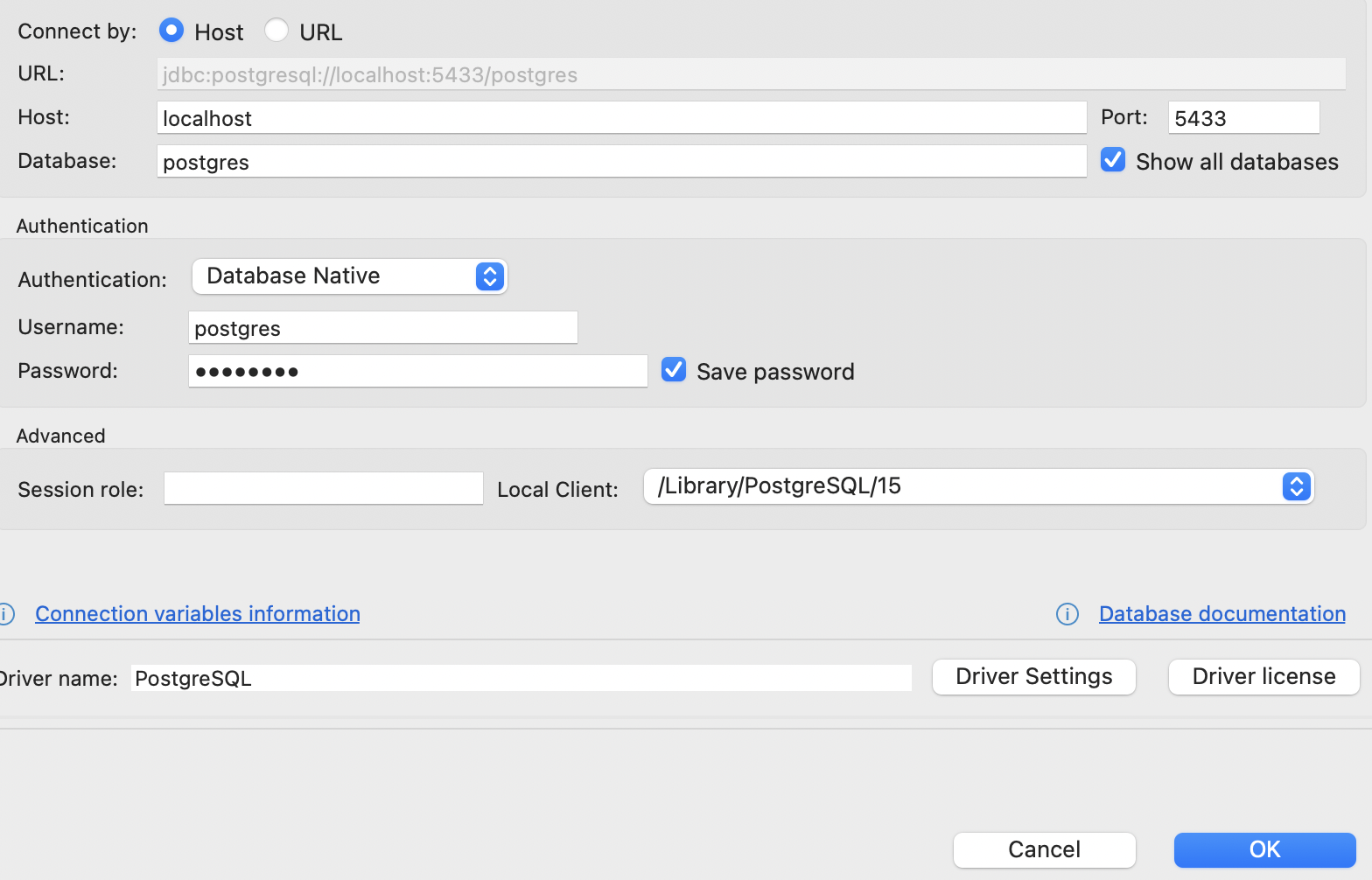
For those of you who would like to look at the data in a visual way, feel free to use DBeaver (which you can download here). Once downloaded and installed, you can preview the DVD Rental database by using the following connection information for a PostgreSQL connection:
- host: localhost
- database: postgres
- username: postgres
- password: postgres
- port: 5433
Also, make sure that the “Show all databases” option is checked (as pictured in the screenshot below):
Tutorial
Now that you’re all set up, please answer the 10 SQL questions (listed below) in the “SQL” section of your lab08/answers_sql.md file. Here are some references from the PostgreSQL tutorial to help you:
SQL Questions
- SELECT - Retrieving Data. Write a query to list the titles and release years of all movies in the film table.
- WHERE - Filtering Data. Write a query to find all customers whose last name starts with the letter ‘S’.
- ORDER BY - Sorting Results. List all films titles and their durations, sorted by their rental duration in descending order. If two films have the same rental duration, sort them alphabetically by title.
- JOIN - Combining Tables. Write a query to list all films along with their categories. Show the film title and category name.
- AGGREGATE FUNCTIONS - Summarizing Data. Write a query to find the average rental duration for movies in each category.
- COUNT - Counting Rows. Write a query to count how many films are in the Action category.
- INSERT - Adding Data. Insert a new customer into the customer table. The new customer should have a first name, last name, email, and be linked to an existing store.
- UPDATE - Modifying Data. Update the rental rate of all films in the Comedy category, increasing it by 10%.
- DELETE - Removing Data. Write a query to delete all films that have never been rented. Make sure to use a subquery to identify the films that haven’t been rented.
4. SQL Alchemy / Python Exercises
Now, you’re going to try connecting to your postgres database using python on your local computer.
Open a terminal window, navigate to your lab08 directory, and install the dependencies in the pyproject.toml file:
poetry install
You should now be able to run the orm_samples.py file as usual from your local terminal:
poetry run python orm_samples.py
Take a look at the file and try to understand what it does. The code samples are very similar to SQLAlchemy tasks you will be completing (below).
SQL Alchemy Questions
You will be implementing some python functions in the
answers_orm.pyas instructed below. Before you begin, please run theanswers_orm.pyscript first to see what it does:
poetry run python answers_orm.py
Note that the first exercise has already been completed for you.
print_titles_and_release_yearsWrite a function that uses SQLAlchemy to print the titles and release years of all movies in the film table.print_customers_starting_withWrite a function that uses SQLAlchemy to print all customers whose last name starts with the character passed into the function.print_film_titles_and_durationsWrite a function that uses SQLAlchemy to print all films titles and their durations, sorted by their rental duration in descending order. If two films have the same rental duration, sort them alphabetically by title.print_film_titles_and_categoriesWrite a function that uses SQLAlchemy to print all films along with their categories. Show the film title and category name.print_num_films_in_action_categoryWrite a function that uses SQLAlchemy to print the number of films in the Action category.create_new_customerWrite a function that uses SQLAlchemy to create a new customer into the customer table. The new customer should have a first name, last name, email, and be linked to an existing store.delete_customer_by_idWrite a function that uses SQLAlchemy to delete a customer from the database based on theidargument.
- Note that many of the customers in the database are referenced in other tables (e.g., each customer is associated with a record in the store table, the address table, etc.). Given this, be sure to test your delete functionality with one of the customers you created in the previous exercise (which has no dependencies yet).
update_customer_emailWrite a function that uses SQLAlchemy to update a customer’s email. Required arguments are the customer’s id and the new email address.
What to Submit
Before you submit, make sure you’ve completed the two sets of tasks:
- SQL tasks: you have written the SQL for the 9 SQL tasks in
answers_sql.md - SQLAlchemy tasks: you have successfully written and invoked the 8 SQLAlchemy-based functions using asynchronous database queries in
answers_orm.py.
When you’re done, please push your lab08-b branch to GitHub and make a pull request. Please ensure that the destination (left-hand side) is pointing to the main branch of your repo and the source (right-hand side) is pointing to the lab08-b branch of your repo. Then, please paste a link to your PR in the Moodle.
Extra Credit Opportunity
If you need extra credit, complete the following tasks:
- Create a SQL statement new table called
movie_reviewswith columns forreview_id,film_id,reviewer_name,rating, andcomments. Then, add a foreign key constraint linkingfilm_idto thefilmtable’sfilm_id.